
Text to Animation in 2026: How AI Turns a Prompt into 3D Motion
Text to animation means typing a description of a movement, such as "a fighter dodges left, then throws a quick punch", and getting back a 3D skeleton animation you can play on a character. It's also called text to motion. The AI writes the keyframes; you pick the best take, check it, and export it to your game engine.
This guide explains what text to animation can and can't do in 2026, how to write prompts that work, and how it compares with video-to-animation tools. We make MocapGen, a text-to-animation tool for Roblox, so we use it for the examples and say where other tools differ.
How does text to animation work?
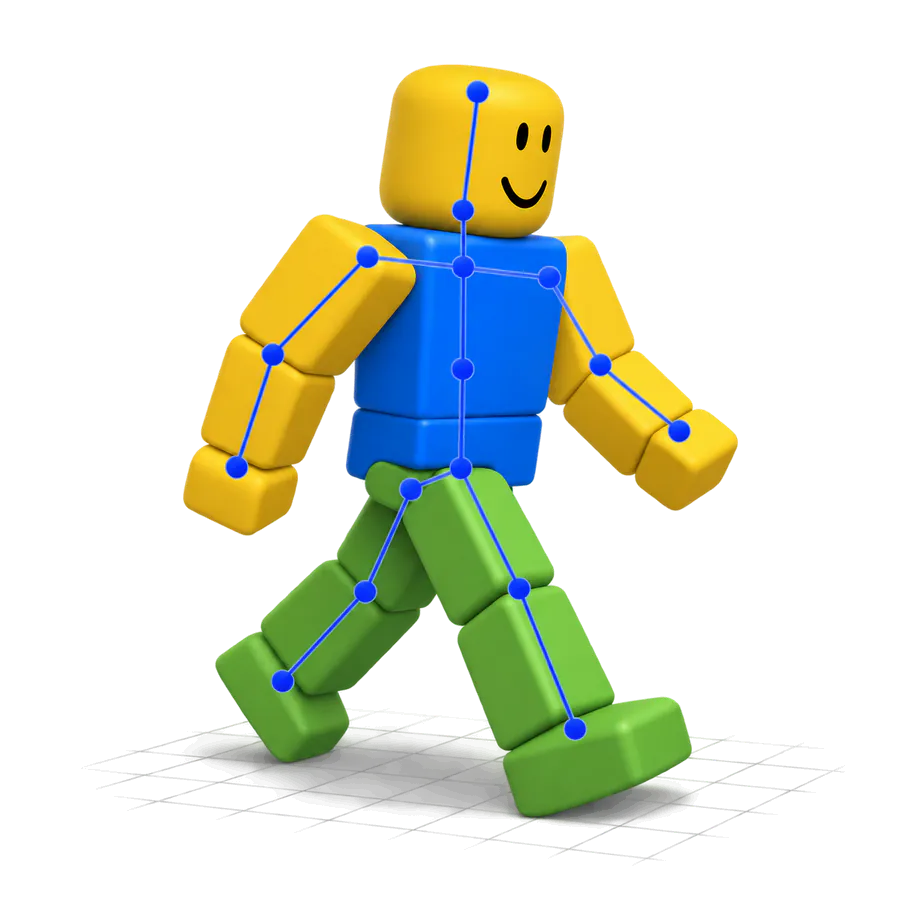
A text-to-motion model is trained on human motion. You give it a prompt and a length, and it outputs joint rotations frame by frame for a standard human skeleton.
That raw output usually isn't ready for your game. It has to be moved onto your character's rig, which is called retargeting, and it often needs clean-up such as keeping the feet on the floor.
MocapGen uses HY-Motion, a motion model Tencent released publicly. The model outputs a 52-bone skeleton at 30 frames per second. We retarget it to the Roblox R15 rig, clean it up, and give you .rbxmx, R15 FBX and Mixamo FBX files.
Other tools use the same model: NoCapMocap and BloxLab both show HY-Motion in their apps. In our same-prompt test, NoCapMocap's R15 FBX had the same skeleton as ours, so the differences we measured came from retargeting and clean-up, not the model.
How do you write a good text-to-animation prompt?
Look at how our 12 homepage sample prompts are written. Each one names a single move and says how the body does it:
- "a friendly wave hello with the right hand" (2 seconds)
- "a sword slash combo ending in a guard stance" (3 seconds)
- "a tired heavy walk with slumped shoulders" (4 seconds, looped)
- "an idle breathing stance with arms relaxed at the sides, slowly looking left and right" (4 seconds, looped)
Notice the pattern: a short move gets a short length, and walks and idles that should repeat use Loop. Prompts must be in English, from 3 to 300 characters.
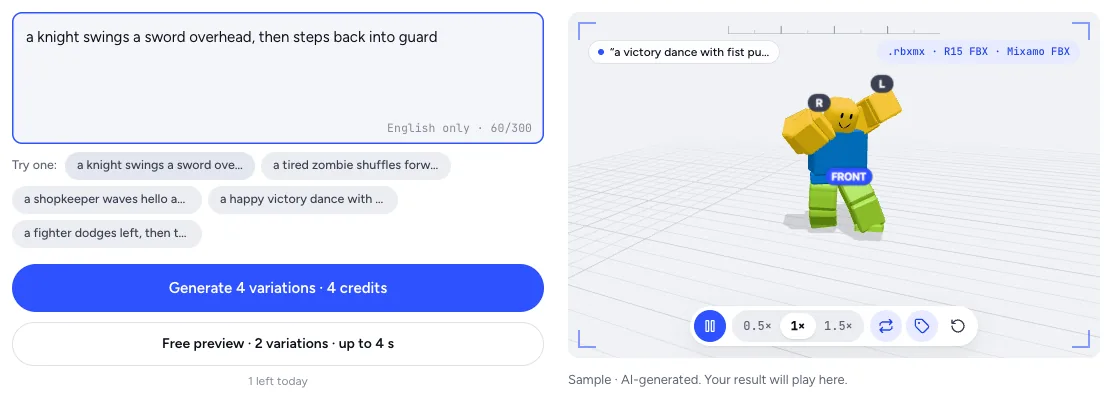
Settings matter as much as wording:
- Length: 0.5 to 10 seconds, in half-second steps.
- Motion mode: Natural moves through space as described, In-place stays on one spot (best for idles and walk or run cycles), and Loop blends the last frame back into the first.
- Strength: five levels from Wild to Strict. Lower is looser; higher sticks closer to your words.
Then generate. MocapGen returns 4 variations per run, because the same prompt can produce quite different takes.
How do you check a text-to-animation result?
Play every variation before you export, then check the numbers. MocapGen shows a Roblox check for each take: length, root drift, joint speed and whether all R15 parts are present.
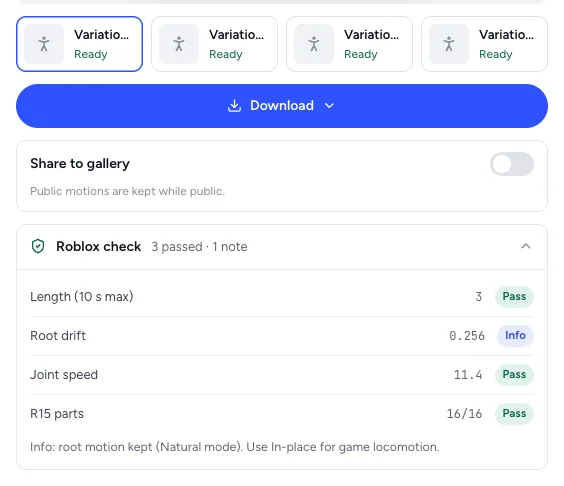
Some flaws come from the model itself, so you'll see them in any HY-Motion tool. In our same-prompt test, both MocapGen and NoCapMocap showed arms passing through the head on big moves, weak arm swing on walks, and idle head turns that are hard to see. Pick the take where these are smallest, or fix them in an editor.
Text to animation vs video to animation: which should you use?
Use text when you can describe the move and don't have footage: combat moves, emotes, NPC idles, stylised walks.
Use video when you need a specific real performance, such as your own dance or a particular gesture. Video tools copy what the camera sees, so filming conditions matter. Roblox's own Animation Capture, for example, asks for one well-lit person in a single shot under 15 seconds.
| Tool | Input | Roblox-ready output |
|---|---|---|
| MocapGen | Text | .rbxmx and R15 FBX |
| NoCapMocap | Text and video | R15 via its plugin, plus FBX |
| Roblox Animation Capture | Video | Keyframes in the Animation Editor (R15) |
| DeepMotion SayMotion | Text | FBX, GLB, BVH or MP4; R15 Block preview character |
| DeepMotion Animate 3D | Video | FBX, BVH, GLB and more |
| Uthana | Text and video | FBX for Roblox Studio, R15 characters |
| QuickMagic | Video, plus text in beta | Roblox export preset on paid plans |
Output details come from each tool's own site on October 4, 2026. For prices and free tiers, see our best Roblox animation maker comparison.
What can't text to animation do yet?
Be realistic about these limits:
- Short clips. MocapGen, NoCapMocap, NPCMotion, Revix and QuickMagic's text beta all cap a clip at 10 seconds. DeepMotion's SayMotion allows longer clips on paid plans.
- Humanoid rigs. These tools target humanoid skeletons. NPCMotion, for example, lists non-humanoid rigs as "Not in Phase 1".
- No fingers on R15. R15 hands are single parts, so finger motion is lost there. MocapGen's Mixamo FBX keeps the finger bones.
- Language. MocapGen only takes English prompts for now.
How much does text to animation cost?
Pricing models vary a lot, so compare them by seconds of animation.
MocapGen charges 1 credit per second, rounded up, with a 4-credit minimum per run of 4 variations. Credit packs start at $7 for 25 credits and never expire; plans start at $9 a month for 50 credits. Signed-in users also get 1 free preview a day (2 variations, up to 4 seconds, online only). Details are on the pricing page.
FAQ
Is text to animation the same as text to motion?
Yes. Both mean generating 3D skeleton motion from a written prompt, and the two names are used interchangeably.
Can I use text-to-animation output outside Roblox?
Yes. MocapGen's Mixamo FBX uses standard Mixamo bone names for Blender, Unity and Unreal. Our Mixamo alternative guide shows how to bring it into each.
Do I need to know animation to use it?
No, but it helps for fixes. Our guide to making Roblox animations shows how to import a generated clip and adjust it in Studio. To try it now, open MocapGen's text to R15 generator.
Information checked October 4, 2026. Competitor details come from each vendor's own pages on that date; MocapGen numbers come from our current pricing and product settings.